
With the online shop, guests can order food for pickup or delivery, with no commission. They pay online or in cash on pickup or delivery. The online shop is a module.
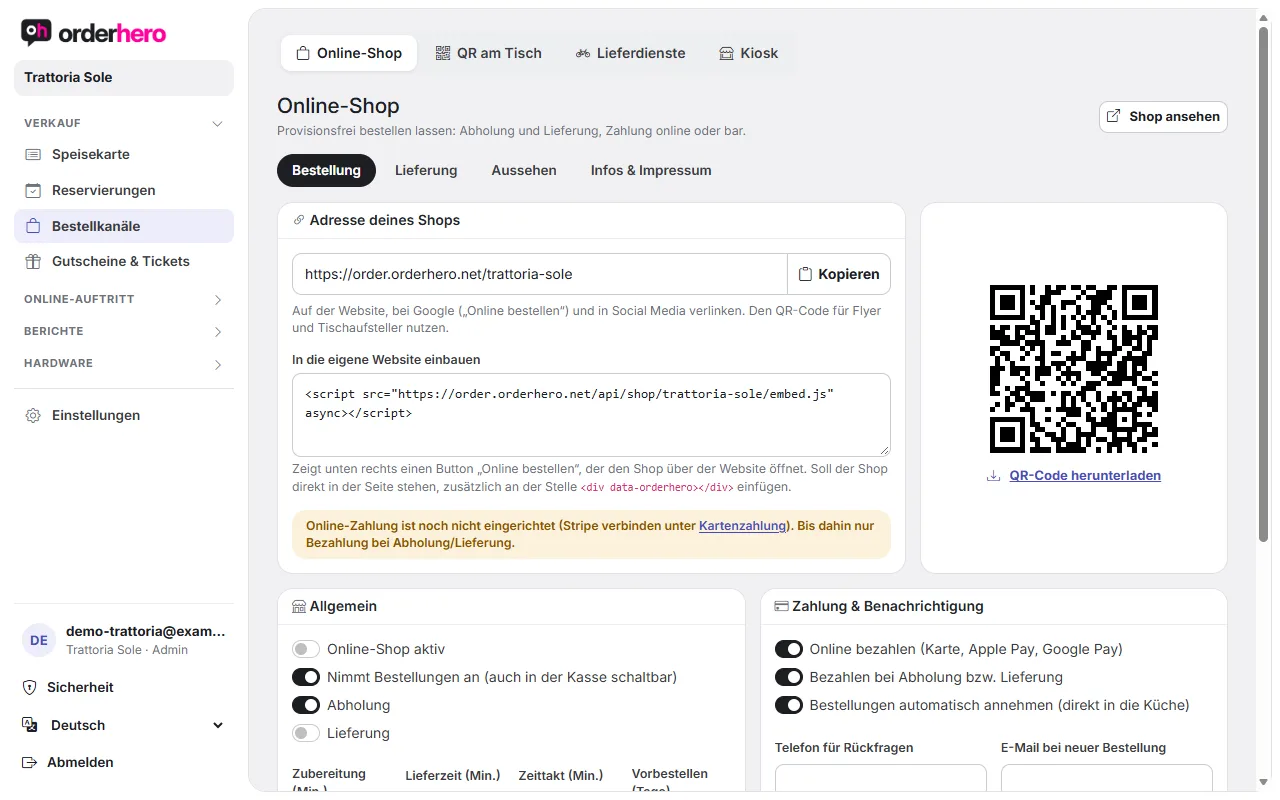
Öffne ihn unter Bestellkanäle → Online-Shop.
Address and embedding
At the top you'll find your "Shop address" with the "Copy" button. Link to it on your website, on Google ("Order online") and on social media.
- Download QR code: For flyers and table stands.
- Embed in your own website: Copy the code into your page. It shows an “Order online” button at the bottom right, which opens the shop over your website. If you want the shop to appear directly in the page, also add
<div data-orderhero></div>where you want it. - View shop: Opens the shop for review.
General
- Abholung und Lieferung schaltest du einzeln ein.
- Preparation (min.), Delivery time (min.), Time slot (min.) and Pre-order (days) determine when guests can order.
- Order times follow your opening hours (Settings → Opening hours).
Payment and notification
- “Pay online (card, Apple Pay, Google Pay)” requires a connected Stripe account (Settings → Card payment). Until then, only payment on pickup or delivery is possible.
- “Pay on pickup or delivery” allows cash payment.
- “Accept orders automatically (straight to the kitchen)” sends orders immediately to the kitchen display and the printers.
- Enter a phone number for questions and the email address for new orders. You can also set a notice at the top of the shop.
Delivery area
Choose "By postal code" or "By distance".
- Postal codes: one per line, optionally with its own fee and minimum value. Format:
ZIP=fee/minimum order value. Empty means no restriction. - Zonen nach Entfernung: je Zeile
bis km=Gebühr/Mindestbestellwert, zum Beispiel3=2.00/15für bis 3 km, 2,00 € Gebühr, ab 15 € Bestellwert. Weiter als die letzte Zone wird nicht geliefert. Dafür braucht der Shop deine Adresse (unter Design & Branding). - Default values: Delivery fee, minimum order value and "Free from" (0 means never).
Guests see the fee and minimum order value for their address right in the cart.
Aussehen und Pflichtangaben
You set the logo and cover image, colors and font, and whether item images are shown on this page. "Location" contains the restaurant's address. You manage the legal notice (mandatory information under § 5 DDG) under Design & Branding in the "Company & receipt" or "Legal notice" section.
View orders
At the bottom of the page, you'll see “Online orders (last 2 days)” with number, received, guest, type, payment, total and status.