
With the DATEV export, your tax advisor gets the POS sales as a ready-made batch of bookings. Entries are booked per business day: cash or cash in transit against the revenue accounts, voids netted.
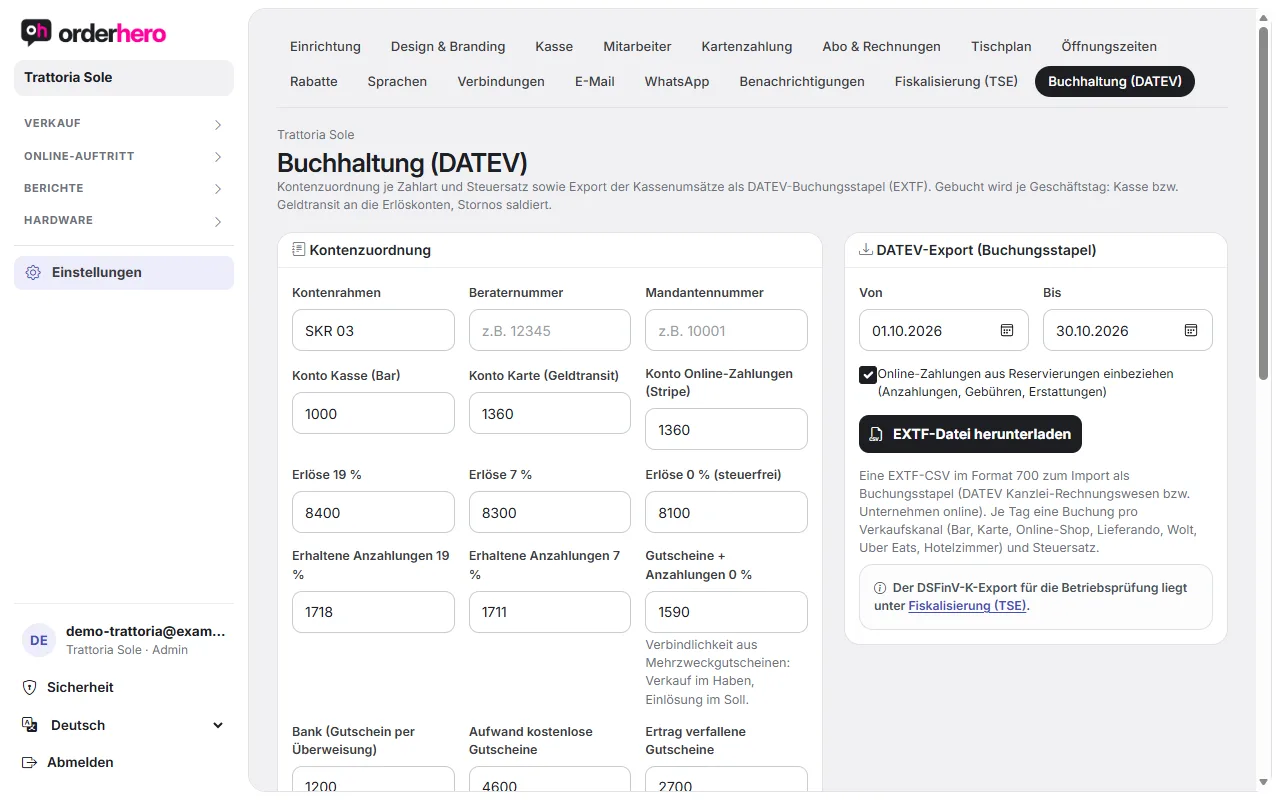
You'll find everything under Settings → Accounting (DATEV).
Set up account mapping
It's best to clarify the account numbers with your tax advisor.
- Choose the chart of accounts and enter the consultant number and client number.
- Ordne die Konten zu:
- Cash account (cash register)
- Card account (money in transit)
- Konto Online-Zahlungen (Stripe)
- Revenue at 19%, 7% and 0% (tax-exempt)
- Down payments received 19% and 7%, as well as vouchers and down payments 0%
- Bank (voucher by bank transfer)
- Aufwand kostenlose Gutscheine (für im Admin kostenlos ausgestellte Gutscheine)
- Income from expired vouchers (remaining balance after the validity period, excluding VAT, confirm with your tax advisor)
- Optionally, assign your own accounts under Accounts per sales channel, for example a clearing account per platform. This makes it easy to reconcile payouts from Lieferando, Wolt and Uber Eats. Empty means cash register (cash) or card account.
- Tap “Save”.
In DATEV, revenue accounts are usually automatic accounts, so the tax is posted along with them.
Eigene Zahlungsarten
Bar und Karte sind immer vorhanden. Eigene Zahlungsarten wie PayPal, Rechnung oder Essensmarken erscheinen an der Kasse als zusätzliche Kachel. „Unbar“ heißt: Es wird kein Kartenterminal angesprochen. Jede Zahlungsart bekommt im DATEV-Export ihr eigenes Konto. Lege sie in der Tabelle „Zahlungsarten“ mit Name, Symbol, Art, DATEV-Konto und Aktiv-Schalter an.
Create export
- Select the period (“From” and “To”).
- Setze optional das Häkchen „Online-Zahlungen aus Reservierungen einbeziehen“ (Anzahlungen, Gebühren, Erstattungen).
- Tap "Download EXTF file".
The file is an EXTF CSV in format 700 and can be imported as a batch of postings into DATEV Kanzlei-Rechnungswesen or Unternehmen online. For each day, one posting is created per sales channel (cash, card, online shop, Lieferando, Wolt, Uber Eats, hotel room) and tax rate.
Receipts from reservations
Further down you see the receipts from reservations of the last 90 days, i.e. deposits, fees and refunds, each with a PDF.
Gut zu wissen
- The DSFinV-K export for tax audits is something different. You'll find it under Settings → Fiscalization (TSE).
- Multi-purpose vouchers are booked to the voucher account when sold, and tax arises when they are redeemed.