
Guests book through your own link, and you see everything in the reservation book and the floor plan. Confirmation and reminder are sent automatically by email, with no fee per guest. Reservations is a module.
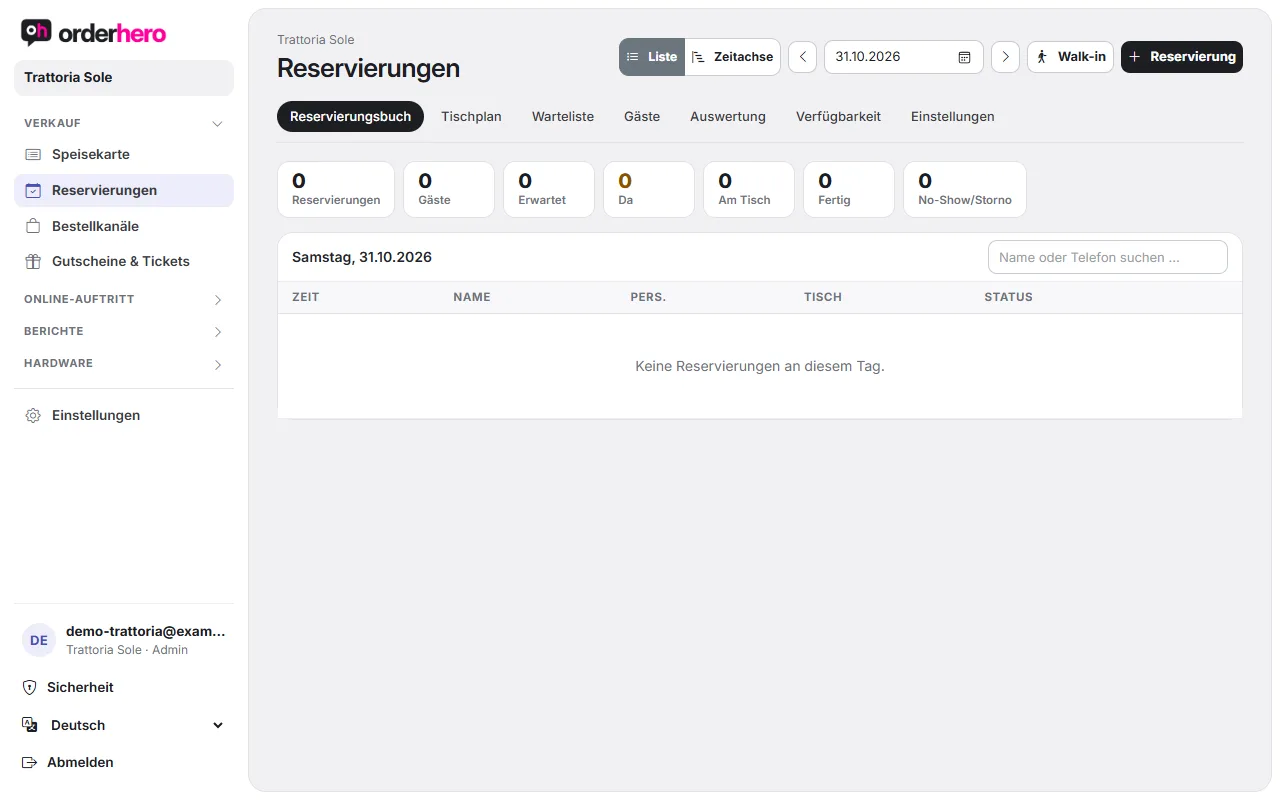
Open it via Reservations in the navigation. At the top, you switch between reservation book, floor plan, waitlist, guests, reports, availability, and settings.
Basic settings
- First create a floor plan (Settings → Floor plan). Without it, capacity and table assignment don't work.
- Open Reservations → Settings.
- Turn on "Online reservations active" and set From, To, Interval (min.), Lead time (min.) and Max. guests.
- Lege die Sitzdauer je Gruppengröße fest (bis 2, 3 bis 4, ab 5 Personen). So lange gilt der Tisch als belegt.
- Trage unter „Interne Benachrichtigung an“ eine E-Mail-Adresse ein. Sie bekommt Mails bei neuer Online-Reservierung und Gast-Storno.
- Set the guest reminder (hours in advance, 0 means off) and tap “Save settings”.
Fine-tune availability
Under Reservations → Availability, you get finer control:
- Service times: When bookings are possible, at what interval and how many guests per arrival time (pacing). For each service time, you set the days, first and last arrival and the bookable areas.
- Events & special days: For example New Year's Eve or brunch with their own hours.
- Block: Venue, area or individual tables can't be booked online for a period. Staff can still assign blocked tables.
- Bookable online: Which areas and tables guests can book themselves. Tables that are turned off can only be assigned by staff.
- Tischkombinationen: Tische, die für größere Gruppen zusammengestellt werden.
- Blackout days: Can also be entered under Settings, for example for holidays.
Im Alltag
The reservation book has a “List” view and a “Timeline” view. Clicking a bar in the timeline opens the actions.
- Reservation: Create a reservation manually (date, time, guests, name, phone, email, notes).
- Walk-in / waitlist: Seats guests without a reservation or puts them on the waitlist if no table is free.
- The status moves through “Arrived”, “Place” and “Done”. There are also “No-show” and “Cancel”.
Guests and analytics
Gästeprofile entstehen automatisch mit jeder Reservierung mit Telefon oder E-Mail. Unter „Gäste“ siehst du Besuche und No-Shows und kannst als CSV exportieren. Die Auswertung zeigt zum Beispiel No-Show-Quote, Auslastung und die Herkunft der Reservierungen.
Reservation on the website
In den Einstellungen findest du:
- Embedded form (recommended): Copy the code to the desired spot on your website.
- Floating button "Reserve a table".
- Reservation links with source tracking for Google, Instagram or emails.
Enter the Google link in your Google Business Profile under “Edit → Bookings/Reservations”. A “Reserve” button will then appear in Google Maps and Search. You can find the connection with your Google account under Online presence → Google.
Host tablet
Ein Tablet kann nur Reservierungen, Tischplan und Zeitachse zeigen. Stelle dazu die Kasse unter Hardware → Kassen auf „Modus: Empfang (nur Reservierungen)“. Für andere Geräte legst du in den Einstellungen ein „Web-Empfang“ mit Verbindungscode an.