
Die Warenwirtschaft zeigt dir, was jedes Gericht kostet, was im Lager liegt und was knapp wird. Die KI macht die Tipparbeit, du bestätigst nur. Warenwirtschaft ist ein Modul.
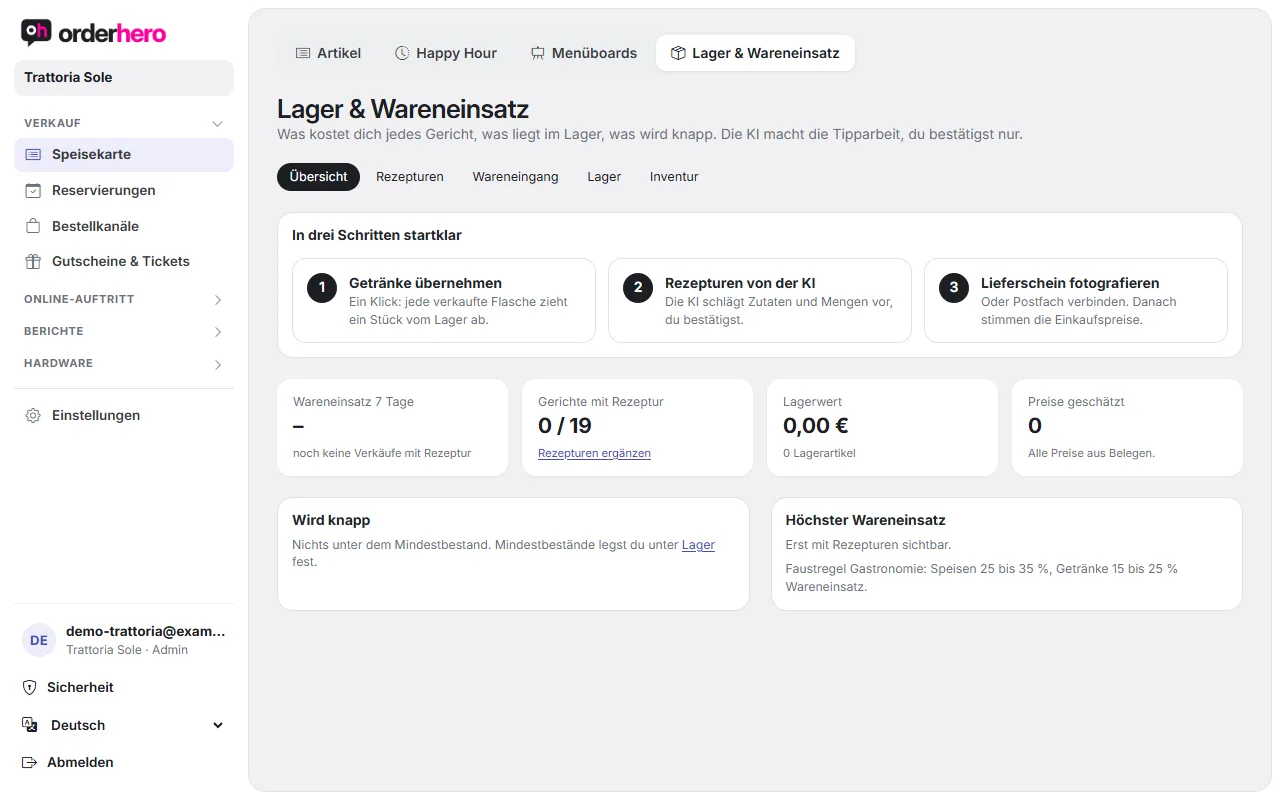
Öffne sie unter Speisekarte → Lager & Wareneinsatz. Oben wechselst du zwischen Übersicht, Rezepturen, Wareneingang, Lager und Inventur.
Ready in three steps
- Import drinks
- Let AI suggest recipes
- Photograph the delivery note (or connect your mailbox) so purchase prices are correct
Import drinks as stock items
Flaschen und Dosen brauchen keine Rezeptur: ein Verkauf bedeutet ein Stück weniger im Lager. Hake in der Übersicht alles an, was du zählst, und tippe auf „Ausgewählte übernehmen“.
AI-generated recipes
Im Reiter „Rezepturen“ schlägt die KI für die nächsten 10 Gerichte ohne Rezeptur Zutaten und Mengen pro Portion vor. Prüfe die Zahlen kurz und tippe auf „Übernehmen“. Jede verkaufte Portion zieht dann die Zutaten vom Lager ab. Die Liste zeigt pro Gericht Netto-Preis, Wareneinsatz und Anteil. Ein „~“ bedeutet, dass der Wareneinsatz geschätzte Einkaufspreise enthält.
Photograph delivery note
- Open the “Goods received” tab and tap “Add document”. Choose a photo or PDF. On a phone, the camera opens right away.
- Alternatively, in the POS app go to Back office → "Photograph delivery note". Booking in is then done in the dashboard.
- The AI reads supplier, items, quantities and prices. This takes about 20 seconds.
- The receipt appears under "To review and recent" with the status "to review". Check what's on the receipt, which stock item orderhero assigns, quantity, unit and price per unit.
- Tap “Book in” or “Discard”.
The other statuses are "being read", "unreadable" and "posted". With the next posted delivery note, estimated prices become exact.
Invoices from the mailbox
If you receive invoices by email, orderhero fetches them automatically every hour. It's best to set up a dedicated mailbox, for example rechnungen@dein-restaurant.de.
- In the “Invoices from mailbox” section, enter server (IMAP), port, user, password and folder.
- Set “Fetch hourly” and tap “Save and test”.
Gmail and Microsoft 365 require an app password. Only PDF and image attachments are read.
Inventory
The "Inventory" tab lists all stock items with name, unit, stock level, minimum stock ("Minimum"), purchase price per unit, storage location and value. Stock updates automatically: sales deduct, goods receipts and stocktakes add. Only correct it here if needed, or create new items with "Create".
Stocktake
Gehe mit dem Handy durchs Lager und trage ein, was da ist. Leer bedeutet: nicht gezählt. Die Abweichung zum Soll ist Schwund oder Mehrbestand.
Overview
The overview shows the cost of goods for the last 7 days, how many dishes have a recipe, the stock value, the number of estimated prices, what is running low and which dishes have the highest cost of goods. As a rule of thumb in hospitality, aim for 25 to 35% for food and 15 to 25% for drinks.